
XPath (XML Path ) is a powerful Selenium locator strategy which are used to navigate and find elements in a web page’s HTML structure .
What is XPath?
Xpath is XML Path language which is an expression language that is used to find the web elements . You can use XPath to traverse among elements and attributes in an XML document .
Why XPath is used for ?
- XPath is used for query or transform XML documents.
- XPath is used to traverse elements , attributes and text through an XML document .
- To find particular elements or attributes with matching patterns
- To extract information from any part of an XML document
- To uniquely identify or address parts of an XML document
- XML Path is used for test addressed nodes within a document to determine whether they match a pattern.
Syntax :
//tagname[@attribute=’value’]
XPath Expressions :
| SYMBOL | DESCRIPTION |
|---|---|
| // | This symbol selects nodes in the document from the current node that match the selection , no matter where they are |
| / | This symbol selects the root node |
| @ | Select the attribute |
| tagname | This symbol signify the Tag name of the current node |
| attribute | This symbol signify the attribute name of the node |
| value | Value of the attribute |
Example : In this example , we are locating the input element whose ‘id’ is equal to ’email-input’
//input[@id=’email-input’]
Types of XPath :
- Absolute XPath
- Relative XPath
- Absolute XPath : Absolute XPath uses the root element of the HTML/XML code and followed by all the elements which are necessary to reach the desired element. Absolute XPath starts with the forward slash ‘/’ . Generally , Absolute XPath is not recommended because in future if any of the web element added or removed then whole absolute path need to changed which is a time consuming process.
Let’s understand the absolute xpath with the help of following :
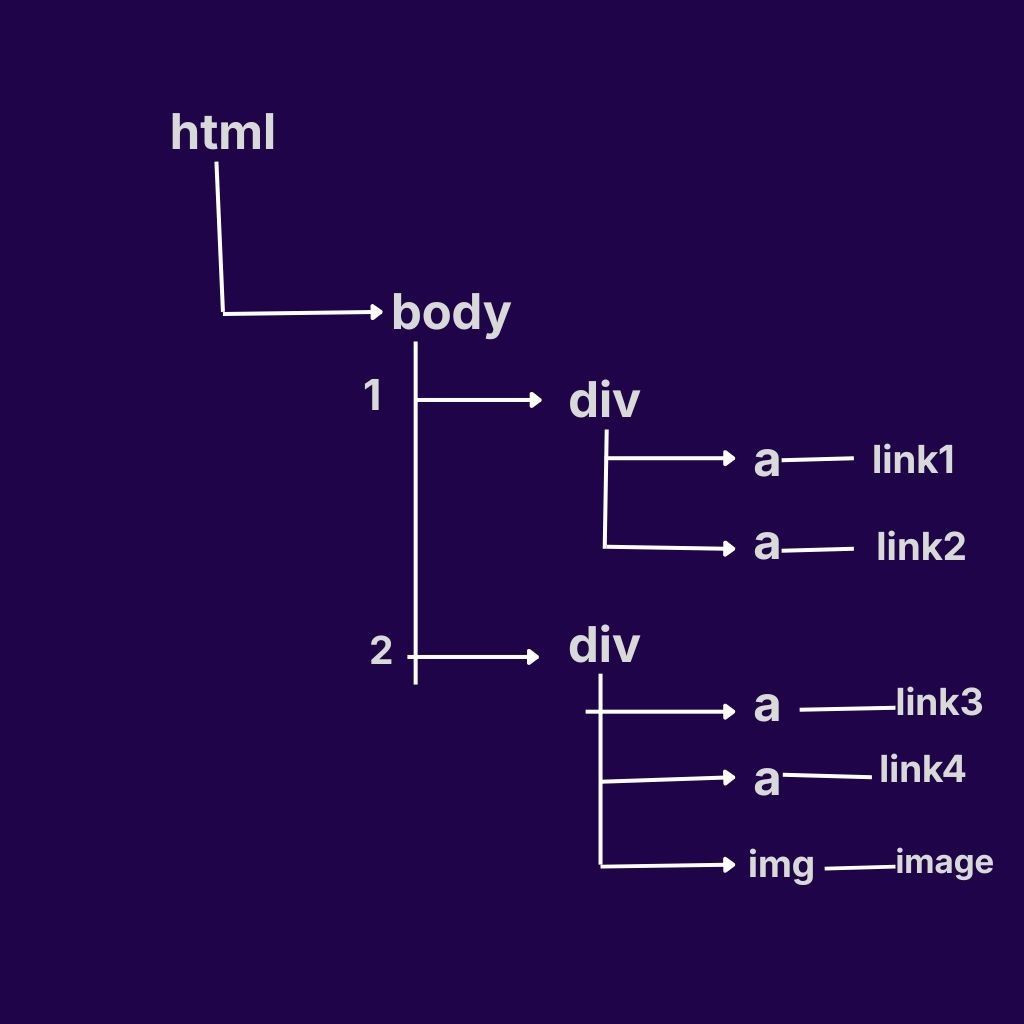
Q. Write the absolute XPath for link1 from the above html directory.
ans: /html/body/div[1]/a[1]
Q. Write the absolute XPath for link1,link2,link3,link4 from the above html directory.
ans : /html/body/div/a
Q. Write the absolute XPath for img in the above html directory.
ans : /html/body/div[2]/img
2. Relative XPath : Relative XPath begins with the double forward slash ‘//’ which means it can search the element anywhere in the Webpage . Generally relative xpath is preffered as they are not complete path from Root node which makes it time efficiency and easy to manage.
Let’s understand the relative XPath from above diagram1:
Q. Write the Relative Xpath for link1 in the above html directory of diagram1.
ans : //div[1]/a[1]
Q. Write the Relative XPath for link 1 and link 3 in the above html directory of diagram 1 .
ans : //a[1]
Q. Write the Relative Xpath for link 2 and link 4.
ans : //a[2]
Q. Write the Relative XPath for all the links and images of the html directory from the above diagram1.
ans : //a|//img
Q. Write the relative XPath for link 2 and link3.
ans : //div[1]/a[2]|//div[2]/a[1]